A REXX with a graphical debugger. S/REXX implements IBM’s SAA procedural language REXX. It is identical to the REXX you already use, and adds important facilities.
Compatible
S/REXX is strictly compatible with all the instructions and built-in functions defined within Cowlishaw REXX level 4.0, with the sole exception of NUMERIC DIGITS, which is limited to 15.
There are no implementation size or shape limits. If your system has enough memory to handle your program, S/REXX will handle it. For example, there are no limits on:
- Procedure size.
- Expression complexity.
- The number of nested parentheses.
- The number and content of variables.
- Recursive function depth.
- The number and size of arguments.
On Linux, when an S/REXX procedure file starts with:
#!/home/xed/srexx
it becomes a system command, and can be executed by simply typing its name. SEDIT’s full S/REXX support permits the writing of edit macros in REXX. The combination of SEDIT and S/REXX provides a powerful development environment. EXECIO is included to facilitate the porting of REXX procedures from VM/CMS. EXECIO reads and writes to files, and prints on native printers. All options of CMS EXECIO are supported.
And more
With the usual REXX implementation, external procedures in separate files cannot share global variables with the main procedure. S/REXX is able to dynamically load external procedures, by appending them to the end of the main file. The loaded procedure becomes an internal procedure, and is able to share global variables. This facility allows the building of a collection of general utility routines, and incorporating them when needed in different programs.
Using backquotes, you can retrieve the result of external commands directly into a REXX expression. For example:
a = `"hostname"`
retrieves the computer’s host name into the variable a.
The DO instruction has an extended syntax.
DO var1 IN expr
  ..
  ..
END
will execute the loop as many times as there are words in the expr expression. The var1 variable is set to the value of each successive word.
For instance, the following DO loop:
DO x IN `"ls"`
  parse var x fn "." ft
  if ft='c' then say fn
END
displays all the files with a .c extension.
The trace mode is more detailed than in the CMS REXX implementation. For example, the following PARSE instruction would display:
15 *-* parse var x fn "." ft
       >>> fn <-- "test"
       >>> ft <-- "c"
S/REXX permits bracket indexing of character strings.
Many new built-in functions give access to Linux and Windows facilities.
For example:
- CWD returns the current directory.
- FD returns the directory part of a full file name.
- FN returns the filename part.
- STATE returns extensive information about a file.
- GETENV returns the content of an environment variable.
S/REXX, when used to create SEDIT macros, allows you to easily build Windows or Motif dialog boxes, with input fields, toggles and buttons.
S/REXX is also able to manage, when used within SEDIT, ISPF-like table control files.
The S/REXX interface allows you to create new ADDRESS environments. Sending data to these new environments will trigger user supplied C subroutines, able to retrieve and to set REXX variables.
It is also possible to add, in a similar way, user supplied built-in functions written in C.
S/REXX can therefore be interfaced with any external application offering a C programming interface.
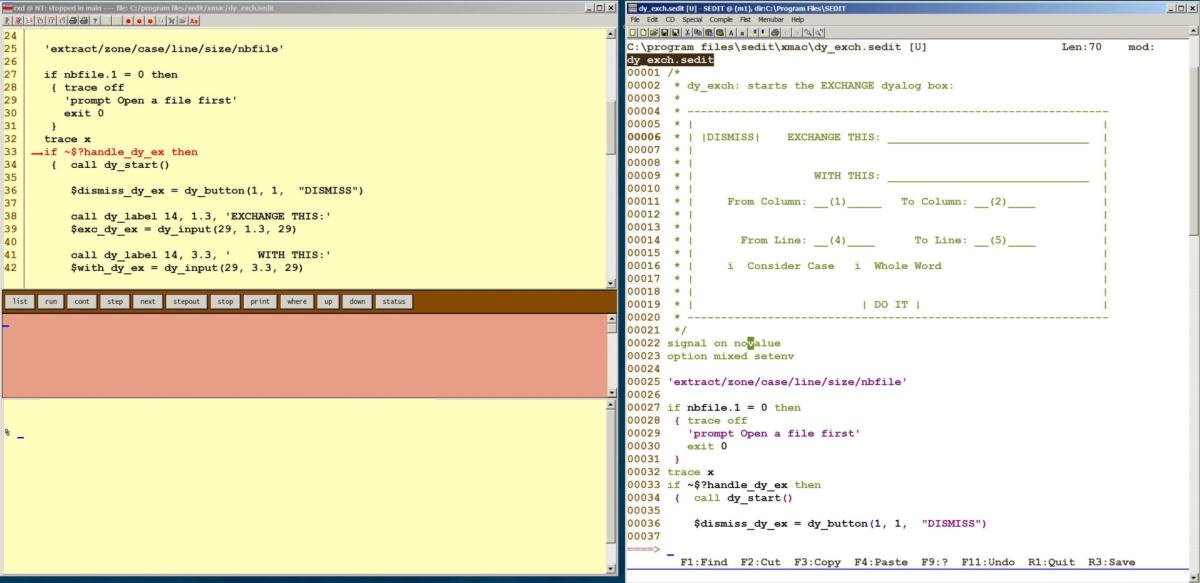
S/REXX supports our graphical S/REXX Debugger, on Windows and on Linux (Motif).
The S/REXX Debugger uses the mouse to scroll the source program, to set or remove stop points, and much more.